
Internal Linking Strategy for a New Blog (Simple System)
Picture a new blog with 22 posts and no linking plan. One morning you open Search Console and see that only 8 pages are indexed. It’s easy to assume Google dislikes your writing. Often the real problem is simpler: the posts never link to each other. Each one floats on its own, and Google has no path to walk.
If you want an internal linking strategy for a new blog that’s actually doable, this is it. No plugin, no spreadsheet, no jargon.
Table of Contents
What an Internal Link Is
Easy one. It’s a link that goes from one page on your site to another page on your site. You’ve clicked thousands of them without noticing.

They matter for three reasons, and I’ll keep them short. Google finds pages by following links. Google also guesses importance from them, so more links pointing at a page usually means more weight. And readers use them to wander deeper instead of leaving.
That’s all the theory you need.
Why a New Blog Needs This First
Older blogs get away with sloppy linking. They’ve got backlinks from other sites, years of history, and Google already knows its way around. A new blog has none of that yet.
So inside a new blog, your own links are basically the whole road map. Break the map and posts can sit unfound for weeks.

Here’s the nice part. A new blog is small, which makes the repair quick. One afternoon is often enough.
Sort Your Topics
Don’t touch a single link yet. First, decide what the blog is about. Two or three topics. Not ten.
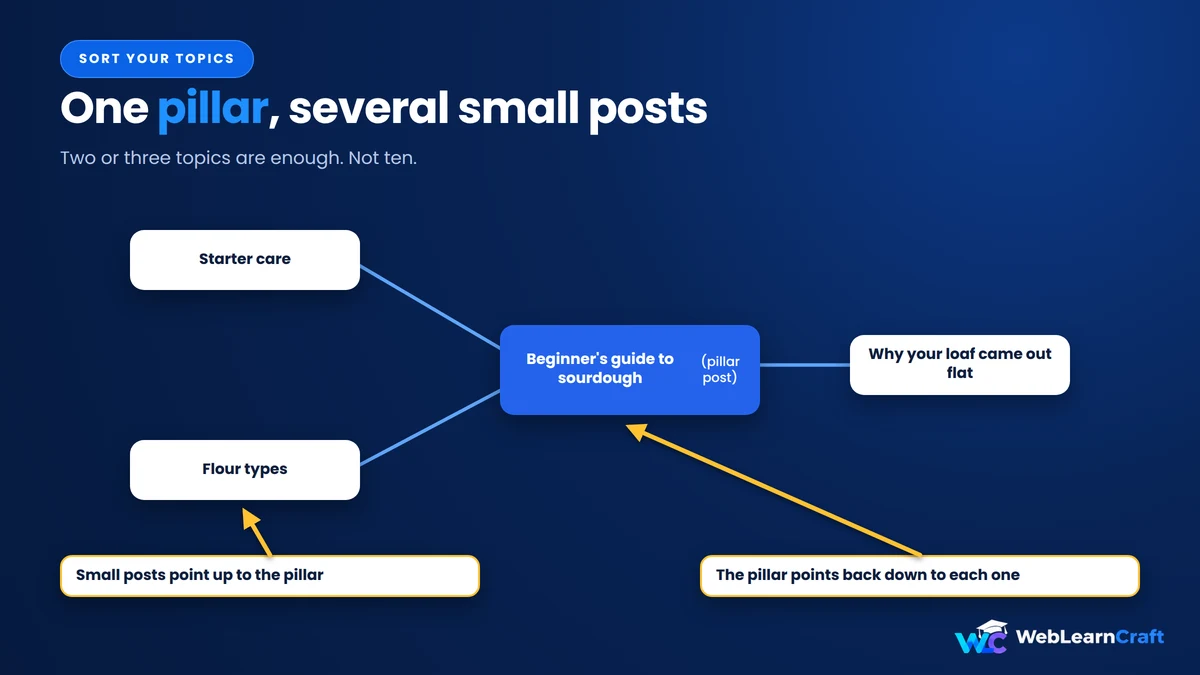
Under each topic, write one big post that covers the whole thing. Lots of people call it a pillar post. Then write smaller posts on narrow questions, and connect them. Small posts point up to the big one, and the big one points back down.
Say you run a blog about baking bread. The big post might be a beginner’s guide to sourdough. The small ones could cover starter care, flour types, and why your loaf came out flat. See how they belong together?
Scribble it on paper. Ten minutes, tops, and you’ll also know what to write next.
The Habit That Fixes Most Things
If you remember one thing from this post, make it this.
Every time you publish, add two or three links from the new post to older posts on a similar subject. That part’s easy since you’re already in the middle of writing.
Now the part everybody skips. Go back to those older posts and add a link that points to the new one. Otherwise the new post is an orphan from the second it goes live. Nothing leads to it.
Takes five minutes. Find a sentence where it fits, drop in the link, save. Do it straight after publishing, because “I’ll do it tomorrow” rarely happens.

Anchor Text Talk
The anchor text is the clickable bit. Google reads it to figure out what the linked page covers, and so do people. Google’s own link best practices say the same.
“Click here” tells nobody a thing. “How to compress images in WordPress” tells everybody exactly what they’ll get. Make it sound like something you’d actually say out loud.
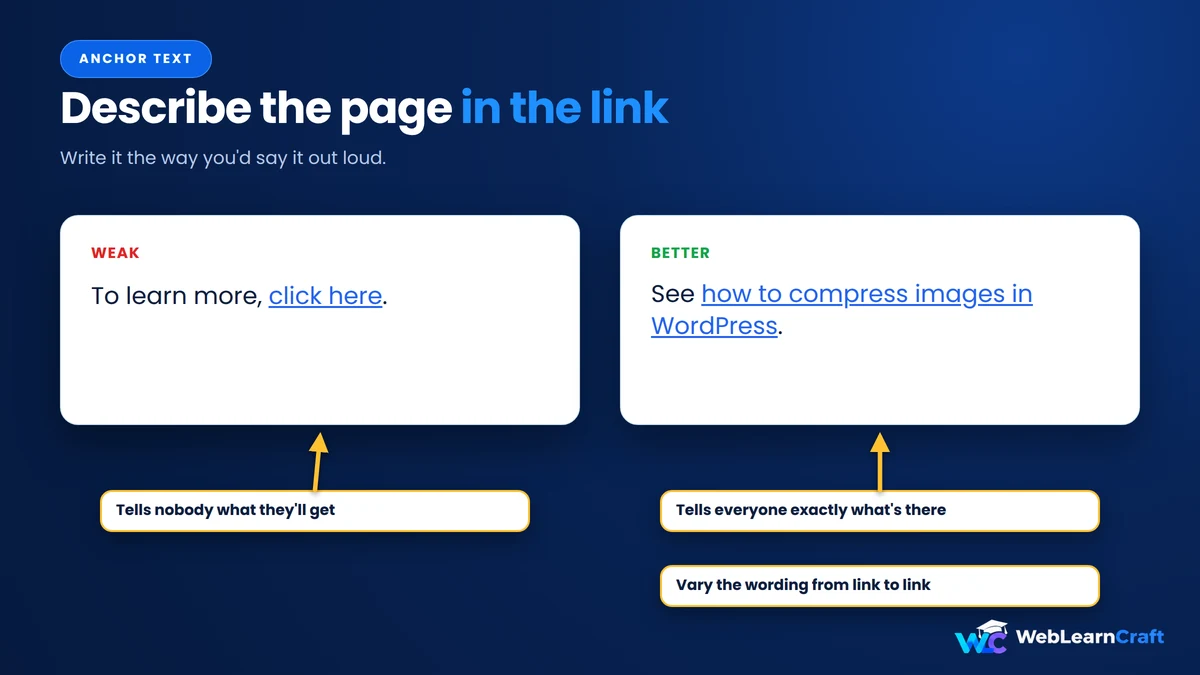
And don’t repeat the same words every time. One link says “speed up your site,” another says “faster loading pages.” That’s how normal people write anyway.
The trap is cramming the exact keyword into every link. It looks forced, and it’s tempting when you’re excited about SEO.
How Many Links
People keep asking for a magic number. Sorry, there isn’t one. But there’s a range that feels right.

A regular 1,500-word post is fine with two to five internal links. A long pillar post can carry ten or more because it’s pointing at all its small posts. If a link doesn’t help the reader, cut it.
A quick test: would a reader want to click it? If so, keep it. If you’re only adding it because a guide said so, delete it.
Just don’t swing to the other extreme. A post with no internal links is a dead end, and dead ends are the whole problem here.
Orphans
An orphan page is a post that nothing else on your site links to. Google may still find it through your sitemap, but it gets ignored a lot, and it often stays out of the index.

On a small blog, you can find these by hand. Go down your list of posts and search your site for each title or URL. Or open the Links report in Google Search Console and look at which pages get the fewest internal links. Those are your suspects. If you want a tool, the free version of Screaming Frog crawls small sites fast.
Found an orphan? Link to it from two or three related posts and you’re done. Recheck once a month.
Also, put your best posts in the menu, the footer, or the homepage. Those spots carry real weight, and a new blog only has a handful of key pages anyway.
A Cleanup You Can Do in One Afternoon
Already have a pile of posts and no plan? Here’s a simple order to work in:
- Sort every post into your two or three topics.
- Pick (or write) one pillar post for each topic.
- Link each small post up to its pillar, and link the pillar back down.
- Find your orphans and link to each one from two or three related posts.
- Put your best posts in the menu, footer or homepage.
Don’t expect a traffic explosion. The goal is a blog that works as one connected thing instead of a pile of random pages. Results depend on your site, so watch Search Console over the next few weeks to see which posts get crawled.
Slip-Ups
- Linking from new posts to old ones, but never from old to new. Your latest content ends up stranded.
- Writing “click here” everywhere. That’s a free chance to describe the page, wasted.
- Linking to everything in sight. Twenty random links in one post just confuse people.
- Forgetting old posts. As the blog grows, early articles sink out of sight, so revisit them.
And please don’t build an enormous spreadsheet system on day one. A simple habit you keep beats a perfect plan you drop.
Frequently Asked Questions
What is an internal linking strategy?
A plan for how your posts link to each other, so Google can find them and readers can keep exploring.
How many internal links should a post have?
For a 1,500-word post, two to five is natural. Longer posts can take more. Only add links that help.
Do internal links help SEO?
Yes. They help Google find pages, see how your content connects, and judge which ones matter.
Should I always use the exact keyword as anchor text?
No. Sometimes is fine, but mix it up and write the way a person would.
Do I need a plugin?
No. Tools like Link Whisper or Rank Math can suggest links, but a new blog is small enough to handle by hand.
How often should I check for orphan pages?
Monthly is plenty for a new blog. It takes a few minutes.
Should internal links open in a new tab?
Usually not. Keep readers in the same tab for links inside your site.
Wrapping Up
You don’t need anything clever. Pick your topics, link every new post both ways, write anchors a human would write, and check for orphans monthly. That’s the system.
Start today with the posts you already have. Give it an hour, then check Search Console over the next few weeks to see how things change. For more beginner guides, browse the WebLearnCraft blog.
Need help with your site? Contact us and we’ll point you the right way.
Big respect from Canada
Thanks sister❤️